 Roost, by meeri
Run your guest house from your phone
Bookings, payments, receipts and housekeeping for 1 to 30 rooms. One register on your phone and your front desk computer, and it keeps working when the internet does not.
- Free for up to 5 rooms
- Works offline
- No card to start
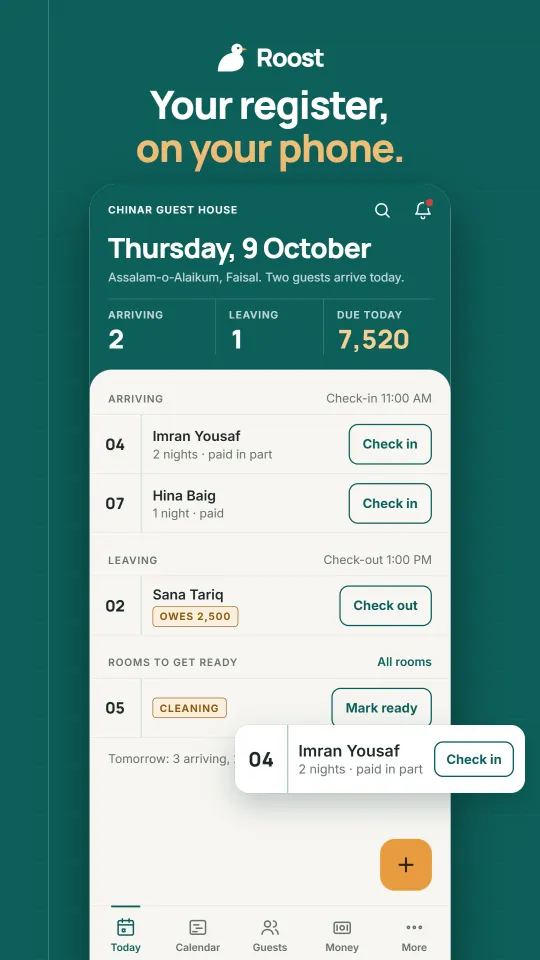
- 1 to 30 roomsGuest houses and small hotels
- Works offlineBookings save without signal
- Checkable receiptsA QR code on every payment
- Phone and WindowsOne account, always in step
Everything your paper register does, without the mistakes
No more double bookings
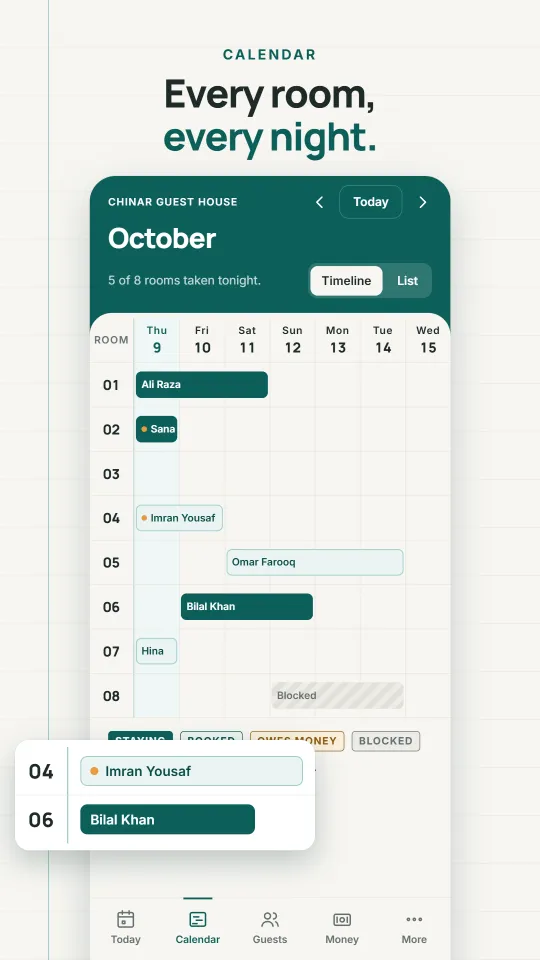
Every room is a row and every stay a bar across the week. Roost will not let you book a room that is already taken for those dates.
- See the whole week, room by room
- Free rooms are easy to spot
- Each stay keeps its own check-in and check-out time
A booking in a few taps
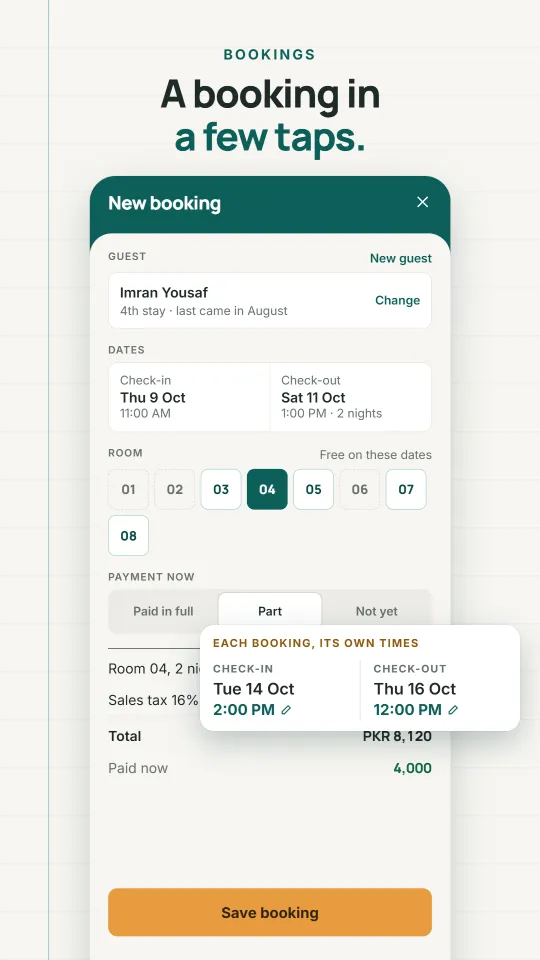
Pick the guest, the dates and a free room, add extras such as breakfast, and take a full, part or no payment.
- Know who still owes, and how much
- What came in and what went out, every day
- A reminder at each guest's own check-in and check-out time
Issued by this business
- Business
- Chinar Guest House
- Receipt
- MA-2026-0086
- Amount
- PKR 5,020
The guest's name is never shown.
Receipts anyone can check
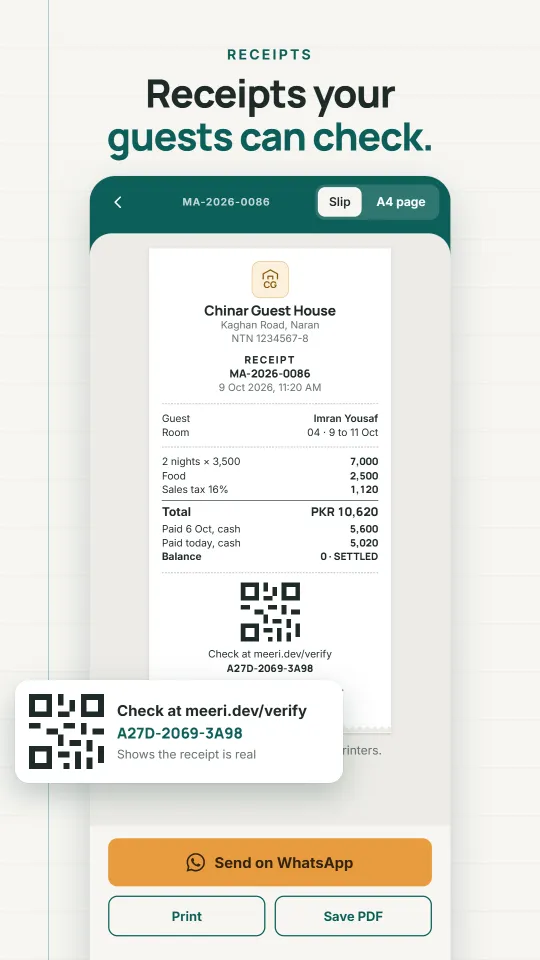
Every payment gets a numbered receipt, as a thermal slip or an A4 page with your logo. A QR code lets a guest, an agent or your accountant check it at meeri.dev/verify, without an account.
- Share it on WhatsApp or print it
- Proof of every rupee your staff take
- The guest's name is never shown on the check
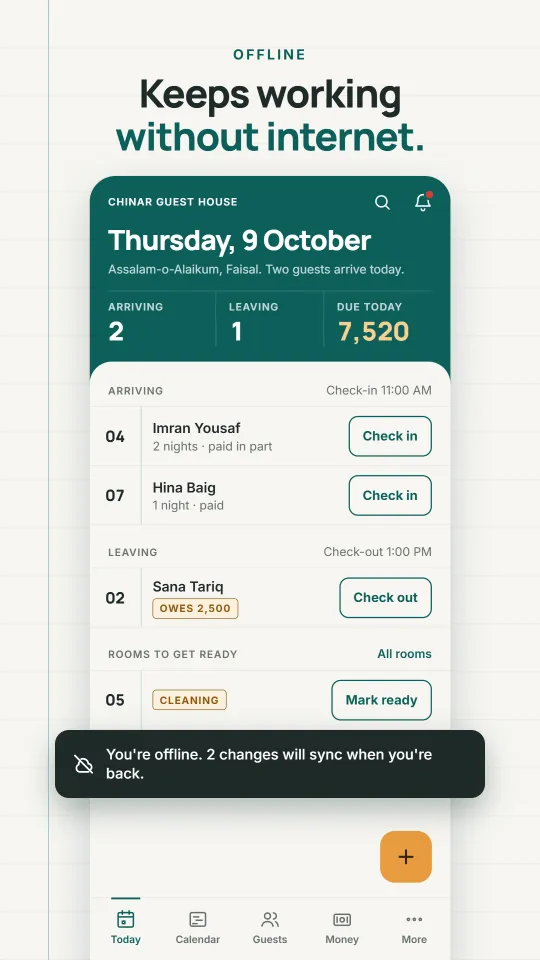
Works when the signal does not
Made for valleys, load-shedding and weak Wi-Fi. Bookings, guests, payments and check-outs are saved on the phone and sent when you are back online.
- Check guests in and out with no signal
- Everything syncs by itself later
- Editing, cancelling, photos and new receipts need a connection
Built for the whole team
Staff accounts
Managers, reception, housekeeping and accountants each sign in with their own role.
Housekeeping
See which rooms to clean and mark them ready, so reception knows what to sell.
A better guest form
Camera photos, front and back ID pictures, and IDs for people travelling with a guest.
Reports Premium
Export as PDF or spreadsheet, with full history and custom dates.
Booking.com import Premium
Bring reservations in from a Booking.com file, and guests from a spreadsheet.
Your data stays yours
Never sold, never mixed with another business, and restorable for 30 days if deleted.
The same Roost on your front desk computer
A bigger calendar and booking window, cash book export for the accountant, closing the day with a cash count, and backups to a file. It uses the same account as the phone, so a booking made on one shows on the other.
Free for 14 days, no card needed. Then part of Roost Premium.
- Big-screen calendar and bookings
- Cash book and reports to export
- Close the day with a cash count
- Backup to a file, and restore
- Your logo on receipts and invoices
What Roost does not do
No channel manager
No live sync with Booking.com or Airbnb. You can import a Booking.com file in Premium.
No online payments
Roost records the payments you take yourself. It does not take card payments online.
No iPhone or Mac
Roost runs on Android phones and tablets and on Windows 10 and 11.
Common questions
Is Roost really free?
It is free to start, with ads and up to 5 rooms. Roost Premium removes the ads and the room limit, and adds more. See the pricing above.
Does it work without internet?
Yes, for the everyday jobs. Bookings, guests, payments and check-outs are saved on the phone and sent when you are back online. Editing, cancelling, photos and issuing a receipt need a connection.
How do I check a receipt?
Scan its QR code, or type the code printed under it, at meeri.dev/verify. You can also upload a photo or PDF of the receipt.
Can my staff use it?
Yes. Managers, reception, housekeeping and accountants each sign in with their own account and role, so everyone sees only what their job needs.
Is my data safe?
Your data is never sold and never used to choose ads, each business can reach only its own data, and erased data can be restored for 30 days. Read more on Security and data.
How do I get help?
Email support@meeri.dev. Every message is answered by our team, as soon as we can.
Try Roost beside your register for a week
Keep your book open, and add the same bookings to Roost. If it does not save you time, you have lost nothing.